Supports macOS 12.0+

Control your Mac & External Monitor
Smarter and Cleaner

Keep your laptop open to use keyboard/TouchID while turning off your internal screen completely. Sync brightness/volume via native keys, schedule blue light filter, and boost productivity with Pomodoro and Zen modes.
Open Clamshell 3D Neon Art

Control Your Screen Seamlessly

More than just basic brightness control. Open Clamshell packs advanced display features tailored for MacBook setups.

Smart Clamshell (Blackout)

Blackout your MacBook's internal display completely without closing the lid. Keep using your built-in keyboard, trackpad, and Touch ID smoothly.

Native Brightness & Volume Sync

Control external monitor's hardware (DDC) brightness and sound output using the native MacBook keyboard keys (F1, F2, and volume keys).

🌙 Intelligent Blue Light Filter

Eye care scheduler that dynamically shifts display colors based on local time. Calibrated to prevent color profile clipping.

🍅 Pomodoro & Zen Mode

Stay focused with a full-screen Zen overlay and customizable Pomodoro cycles providing gentle visual feedback for work and breaks.

⚡ Realtime Power & Battery Stats

Monitor your current power adapter wattage, battery health percentage, and charge cycle counts at a glance with a clean layout.

🔄 Seamless Auto-Updates

Get bug fixes and optimizations directly inside the app with the integrated Sparkle 2 update engine—zero hassle, completely secure.

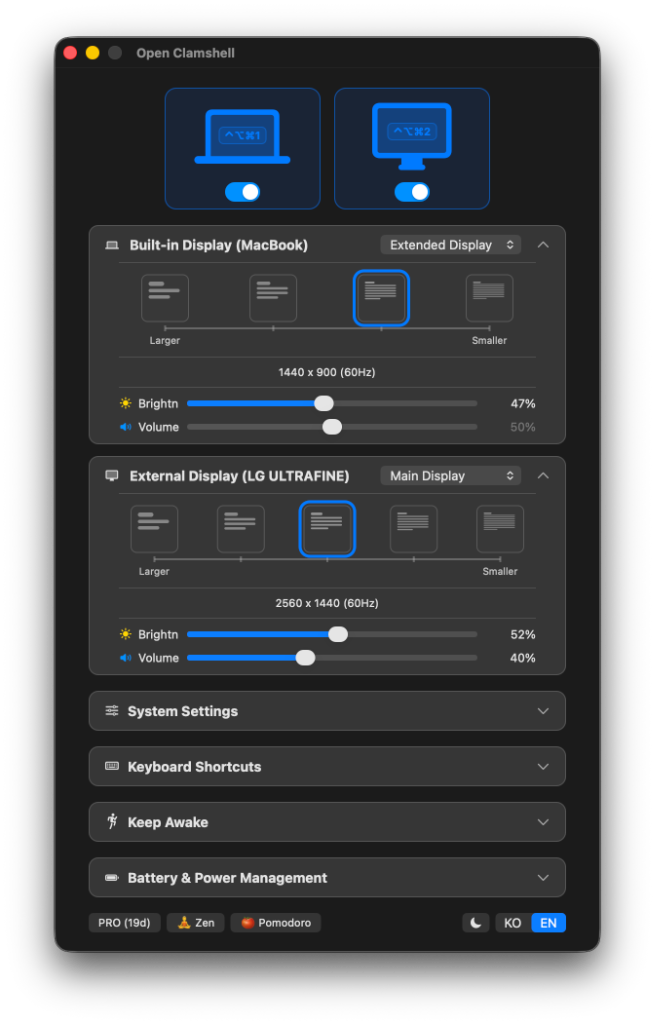
Open Clamshell Control Panel Screenshot

Designed to Look and Feel Native

A compact control panel matching the macOS visual aesthetic. Features native sliders, toggle switches, battery status metrics, and hotkey bindings all balanced in a lightweight menu bar utility.

  • Supports System Dark / Light Mode auto-switching
  • Custom hotkey bindings for keyboard-only navigation
  • Lightweight menu bar item for quick status checks

One-time Purchase, Lifetime Access

Essential monitor controls are always free, and advanced features can be unlocked forever with a single lifetime license.

30-Day Free Trial

$0

No credit card required

  • Access all PRO features for 30 days
  • Smart Clamshell control (Blackout)
  • Basic manual monitor adjustments
  • Automatic minor updates
Download Free Trial

Frequently Asked Questions

Everything you need to know about the license and compatibility.

Q. Can I use my license key on multiple Macs?

Yes, each license key allows you to activate the app on up to 3 personal Macs simultaneously. You can easily deactivate a machine to transfer the license to a new one.

Q. Does it support Apple Silicon (M1/M2/M3) Macs?

Yes, Open Clamshell is built as a Universal Binary, natively supporting both Apple Silicon (M1, M2, M3 series) and Intel architectures. Tested and optimized for macOS 14+ Sonoma.

Q. Is the checkout processed securely?

Yes. Checkout is securely handled by Lemon Squeezy, a globally trusted reseller operating in partnership with Stripe. Your credit card details are encrypted and processed safely under full compliance standards.

Q. Will I be charged automatically when the trial ends?

Absolutely not. We do not use a subscription model. When your 30-day trial expires, advanced features are paused, but core monitor controls remain active. No automatic charges will ever occur.

Elevate Your MacBook Workspace Today

Download the free trial now and enjoy complete control over your screens for 30 days.

Download Trial (.zip)