Supports macOS 12.0+

Control your Mac & External Monitor
Smarter and Cleaner

Keep your laptop open to use keyboard/TouchID while turning off your internal screen completely. Sync brightness/volume via native keys, schedule blue light filter, and boost productivity with Pomodoro and Zen modes.
Open Clamshell 3D Neon Art

Control Your Screen Seamlessly

More than just basic brightness control. Open Clamshell packs advanced display features tailored for MacBook setups.

Smart Clamshell (Blackout)

Blackout your MacBook's internal display completely without closing the lid. Keep using your built-in keyboard, trackpad, and speakers smoothly.

Hardware Brightness & Volume Control

Sync external monitor's hardware (DDC) brightness automatically using native MacBook brightness keys or ambient light sensors, and finely adjust volume with a dedicated slider or custom shortcuts.

🌙 macOS Native Night Shift Integration

Control Night Shift warmth levels directly from the control panel without digging into System Settings. Integrates directly with macOS native APIs to protect your eyes without breaking custom ICC calibration profiles.

🍅 Pomodoro & Zen Mode

Stay focused with a full-screen Zen overlay and customizable Pomodoro cycles providing gentle visual feedback for work and breaks.

🔋 Battery Limiting & Auto-Calibration

Bypass battery charging and run directly on AC power (80% hold) via SMC control. Schedule safe calibration runs every 4-8 weeks, or trigger one instantly ("Run Now"), to reset sensor drift and prevent swelling.

🖥️ Smart Space Sync & Window HUD

When turning display off/on, native fullscreen spaces are safely evacuated and restored. Plus, use the global hotkey HUD to effortlessly send active windows to another monitor instantly.

🖱️ Mouse Trap Prevention

Prevent your mouse cursor from escaping or getting trapped behind a dimmed/blacked-out monitor boundary. Smartly traps the cursor inside active displays.

⚡ Charger Specs & Power Diagnostics

Realtime input power wattage (W) measurements and USB-C adapter transmission negotiation specs fetched directly from SMC to verify charger safety and health.

🔒 Apple Notarized & Auto-Updates

Officially notarized by Apple to pass all macOS Gatekeeper security checks without warning dialogs. Features integrated Sparkle 2 updater for single-click updates.

Explore Every Detail Inside

Click through each category tab below to preview Open Clamshell's clean controls and native UI.

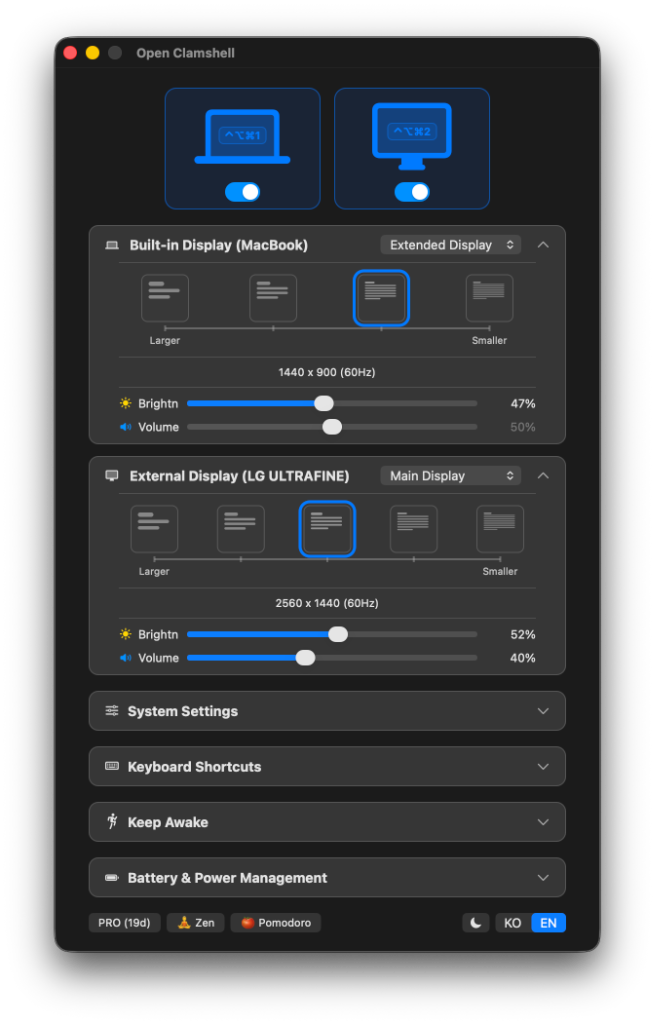
Open Clamshell Control Panel Screenshot

Display & Resolution Control

Seamlessly adjust resolution scaling, hardware DDC/CI brightness, and volume sliders for both Mac display and external monitors in a compact card UI.

  • Resolution scaling presets (Largest to Smallest)
  • Precision 1% DDC/CI hardware brightness & volume adjustment
  • Independent toggle switches for built-in and external displays

One-time Purchase, Lifetime Access

Essential monitor controls are always free, and advanced features can be unlocked forever with a single lifetime license.

30-Day Free Trial

$0

No credit card required

  • Access all PRO features for 30 days
  • Smart Clamshell control (Blackout)
  • Basic manual monitor adjustments
  • Automatic minor updates
Download Free Trial

Frequently Asked Questions

Everything you need to know about the license and compatibility.

Q. Can I use my license key on multiple Macs?

Yes, each license key allows you to activate the app on up to 3 personal Macs simultaneously. You can easily deactivate a machine to transfer the license to a new one.

Q. Does it support Apple Silicon (M1/M2/M3) Macs?

Yes, Open Clamshell is built as a Universal Binary, natively supporting both Apple Silicon (M1, M2, M3 series) and Intel architectures. Tested and optimized for macOS 14+ Sonoma.

Q. Is the checkout processed securely?

Yes. Checkout is securely handled by Lemon Squeezy, a globally trusted reseller operating in partnership with Stripe. Your credit card details are encrypted and processed safely under full compliance standards.

Q. Will I be charged automatically when the trial ends?

Absolutely not. We do not use a subscription model. When your 30-day trial expires, advanced features are paused, but core monitor controls remain active. No automatic charges will ever occur.

Elevate Your MacBook Workspace Today

Download the free trial now and enjoy complete control over your screens for 30 days.

Download Trial (.dmg)